GNU Stow
GNU Stow keeps your configuration files in one organized folder, while every application still finds them in their usual place.
It does this with symlinks [small files that point to another file or directory]. The real file lives in your repository. A link in the normal location points to it.
The typical use is dotfiles [config files whose names start with a dot], such as ~/.gitconfig, ~/.zshrc, ~/.config/nvim/, and ~/.config/wezterm/. Instead of leaving them scattered around your home directory, you keep them all in one Git repository, usually ~/dotfiles/.
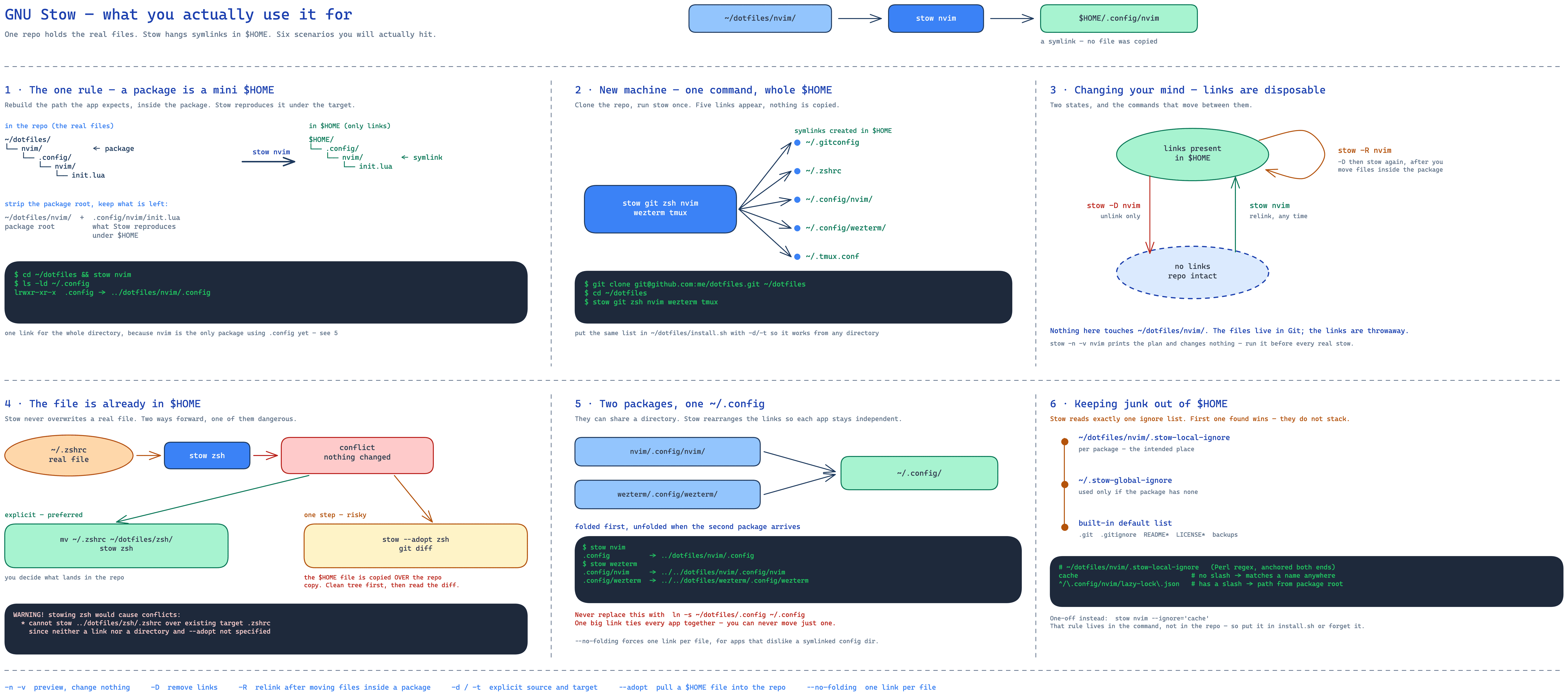
The basic idea
Your home directory normally looks like this:
You want the real files in Git instead:
~/dotfiles/
├── git/
│   └── .gitconfig
├── zsh/
│   └── .zshrc
├── nvim/
│   └── .config/
│       └── nvim/
│           └── init.lua
└── wezterm/
    └── .config/
        └── wezterm/
            └── wezterm.lua
Stow then creates the links:
~/.gitconfig             →  ~/dotfiles/git/.gitconfig
~/.config/nvim/init.lua  →  ~/dotfiles/nvim/.config/nvim/init.lua
Neovim still opens ~/.config/nvim/init.lua. The file it actually reads sits in ~/dotfiles/, under version control.
Three words you need
Stow directory — the folder that holds your packages, for example ~/dotfiles/.
Package — one top-level folder inside the stow directory. One package per application is the usual choice:
Target directory — where the links appear, normally $HOME.
You rarely name the target. Stow defaults it to the parent of the stow directory, and the parent of ~/dotfiles is ~. That is why the standard layout works with no extra flags.
The one rule that explains everything
Each package is a miniature copy of the tree you want under $HOME.
Neovim expects ~/.config/nvim/init.lua, so the package holds:
full path in the repo   ~/dotfiles/nvim/.config/nvim/init.lua
package root            ~/dotfiles/nvim/
what is left            .config/nvim/init.lua
where Stow links it     $HOME/.config/nvim/init.lua
Strip the ~/dotfiles/nvim/ prefix and .config/nvim/init.lua is left. Stow reproduces exactly that path under $HOME, as links.
Install
Create your dotfiles repository
You now have:
Stow your first package
Nested configuration directories
Neovim keeps its config in ~/.config/nvim/, so rebuild that path inside the package:
mkdir -p ~/dotfiles/nvim/.config/nvim
mv ~/.config/nvim/* ~/dotfiles/nvim/.config/nvim/

cd ~/dotfiles
stow nvim
The package looks like this:
And the config shows up again at ~/.config/nvim/.
Stow several packages at once
Preview before you change anything
The safest habit in Stow. -n means change nothing, -v means tell me what you would do:
Verbosity goes up to -vvvvv, but level 2 is usually enough.
Remove and restow
stow -D nvim    # or --delete: remove the links this package created
stow -R nvim    # or --restow: delete, then stow again
-D never touches ~/dotfiles/nvim/. It only removes the symlinks. Your real files stay in the repository.
Use -R after you move files around inside a package, so stale links get cleaned up.
Naming the source and target explicitly
-d is the stow directory, -t is the target. Same result as cd ~/dotfiles && stow nvim, but it does not depend on your current directory, which makes it the right form inside scripts.
When the target file already exists
If ~/.zshrc exists as a real file and the package also has one, Stow reports a conflict and stops. It does not overwrite your file.
The plain fix is to move the file in yourself:
--adopt
--adopt does that move for you: an existing plain file at the target is moved into the package, then linked back.
Careful: this overwrites the version in your repository with whatever was sitting in $HOME. Always run it in a clean Git tree and read the diff afterwards. Do not point it at a large tree until you know exactly what it will pull in.
Ignoring files
Some files in a package should never be linked into $HOME: caches, state databases, editor backups.
Stow picks one ignore list, in this order:
.stow-local-ignorein the top level of the package being stowed.~/.stow-global-ignore, if the package has no local file.- Its own built-in default list, if neither exists.
They do not stack. A package-local file replaces the global one for that package.
The built-in default already ignores .git, .gitignore, .gitmodules, .svn, emacs backup files, and top-level README*, LICENSE*, COPYING. So a normal repository layout needs no ignore file at all: ~/dotfiles/.git and ~/dotfiles/README.md are not packages, so they are never stowed in the first place.
Per-package ignore files
Each package can have its own, and this is the intended way to do it:
~/dotfiles/
├── nvim/
│   ├── .stow-local-ignore
│   └── .config/
└── zsh/
    ├── .stow-local-ignore
    └── .zshrc
Example ~/dotfiles/nvim/.stow-local-ignore:
The patterns are Perl regular expressions [text patterns that match names], not shell globs, so a literal dot has to be escaped as \..
Two matching rules, and the difference matters:
- A pattern without
/is matched against the basename only — the file's own name, no directory part.cacheignores everycacheanywhere in the package. - A pattern with
/is matched against the path relative to the package root, starting with/.^/\.config/nvim/lazy-lock\.jsonignores that one exact file.
Matching is anchored at both ends, so cache does not match cache.db. Use cache.* for that.
.stow-local-ignore itself is always ignored, so it never ends up linked into $HOME.
Ignoring from the command line
Good for a one-off. The catch is that the rule lives in the command, not in the repository, so it has to go into a script or you will forget it. Prefer .stow-local-ignore for anything permanent.
Directory folding
Stow prefers one link over many. Instead of linking each file:
it may link the whole directory at once:
This is called tree folding, and it is normal. Stow unfolds automatically when a second package needs to put something in the same directory.
If a program dislikes having its config directory be a symlink, disable it with --no-folding, which forces one link per file.
Two packages can share .config
Both need ~/.config/. That is fine:
Result:
~/.config/
├── nvim/     →  ~/dotfiles/nvim/.config/nvim
└── wezterm/  →  ~/dotfiles/wezterm/.config/wezterm
This is the reason to use Stow instead of ln -s ~/dotfiles/.config ~/.config. One big link for .config ties every application together, and you can no longer add, remove, or move one of them on its own.
Optional: --dotfiles
A repository full of hidden folders is awkward to browse. With --dotfiles, Stow renames any dot- prefix to a real dot when it creates the link:
Useful, but pick one convention and keep it. Mixing dot-zshrc and .zshrc in the same repository gets confusing fast, and you must pass the flag every time.
A practical dotfiles structure
~/dotfiles/
├── .gitignore
├── README.md
│
├── git/
│   └── .gitconfig
│
├── zsh/
│   ├── .zshrc
│   └── .zprofile
│
├── nvim/
│   ├── .stow-local-ignore
│   └── .config/
│       └── nvim/
│
├── wezterm/
│   └── .config/
│       └── wezterm/
│
├── tmux/
│   └── .tmux.conf
│
├── starship/
│   └── .config/
│       └── starship.toml
│
└── scripts/
    └── .local/
        └── bin/
Adding a new application
Say you want to manage Lazygit, whose config is at ~/.config/lazygit/config.yml:
mkdir -p ~/dotfiles/lazygit/.config/lazygit
mv ~/.config/lazygit/config.yml ~/dotfiles/lazygit/.config/lazygit/

cd ~/dotfiles
stow -n -v lazygit    # check the preview first
stow lazygit

git add lazygit
git commit -m "Add lazygit configuration"
That is the whole daily loop: rebuild the path, move the file, preview, stow, commit.
Setup script for a new machine
#!/usr/bin/env bash
set -euo pipefail

DOTFILES="$HOME/dotfiles"

stow \
  --dir="$DOTFILES" \
  --target="$HOME" \
  git \
  zsh \
  nvim \
  wezterm \
  tmux \
  starship
Save it as ~/dotfiles/install.sh, then:
Commands worth remembering
stow nvim                      # install one package
stow git zsh nvim              # install several
stow -n -v nvim                # preview, change nothing
stow -D nvim                   # remove its links
stow -R nvim                   # remove and re-create its links
stow -d ~/dotfiles -t ~ nvim   # explicit source and target
stow nvim --ignore='cache'     # skip matching files
stow --adopt nvim              # pull existing $HOME files into the package
The mental model
Do not think of Stow as a complicated symlink command. Think of it this way:
Each package is a small copy of
$HOME. Stow makes that small copy show up inside the real$HOME.
~/dotfiles/nvim/          becomes        $HOME/
└── .config/                             └── .config/
    └── nvim/                                └── nvim/
        └── init.lua                             └── init.lua
The real file stays at ~/dotfiles/nvim/.config/nvim/init.lua. The application sees it at ~/.config/nvim/init.lua.
Where to start
- One package per application.
- Preview with
stow -n -v PACKAGEbefore every change. - Add a
.stow-local-ignoreonly to the packages that actually need one. - Commit after each package you add.
Glossary
- Dotfiles — configuration files whose names begin with
., such as.gitconfig. - Symlink — a small file that points to another file or directory.
- Stow directory — the folder holding your packages, usually
~/dotfiles. - Package — one top-level folder inside the stow directory, managed as a unit.
- Target directory — where the links appear, usually
$HOME. Defaults to the parent of the stow directory. - Regular expression — a text pattern used to match names.
- Basename — a file's own name without any directory in front of it.
- Tree folding — Stow using one directory symlink instead of many file symlinks.